Extension: Maintenance

-
Extension Name: ext.magento2.cleverzoeger.maintenance (CleverZoeger_Maintenance)
-
Magento Compatibility: 2.4.9, 2.4.8, 2.4.7
-
PHP Compatibility: 8.1, 8.2, 8.3, 8.4
-
Requires: CleverZoeger_Base (^2.0.0)
The Maintenance extension lets you enable and disable Magento’s built-in
maintenance mode directly from the admin backend – without SSH access or the
bin/magento maintenance:enable CLI command. You can additionally define one
or more IP addresses that are still allowed to access the shop while
maintenance mode is active (e.g. your office or your own IP for testing).
Features
-
Enable / disable the Magento maintenance mode from the backend
-
Manage the IP allowlist (whitelist) that bypasses maintenance mode
-
Manage multiple IP addresses in a repeatable list – one address per row, with add / remove buttons
-
The current admin IP is locked and cannot be removed, and is always kept on the allowlist server-side, preventing accidental self-lockout
-
IPv4 and IPv6 supported, validated in the browser and again on the server
-
Pre-fills the list with the detected client IP when maintenance is off, and with the currently allowed IPs when maintenance is on
-
Proxy-aware IP detection via the
X-Forwarded-Forheader -
Edit the maintenance (503) page content directly in the backend
-
Uses Magento’s native
MaintenanceMode– no custom flag files or DB tables
Implementation
The module registers under the clever+zöger backend menu and adds its own ACL resource, so access can be granted per admin role.
-
Menu: clever+zöger → Maintenance → Configuration
-
Admin route:
cleverzoeger_maintenance/index/index -
ACL resource:
CleverZoeger_Maintenance::Maintenance(child ofCleverZoeger_Base::base)
Backend Configuration
Path: clever+zöger → Maintenance → Configuration
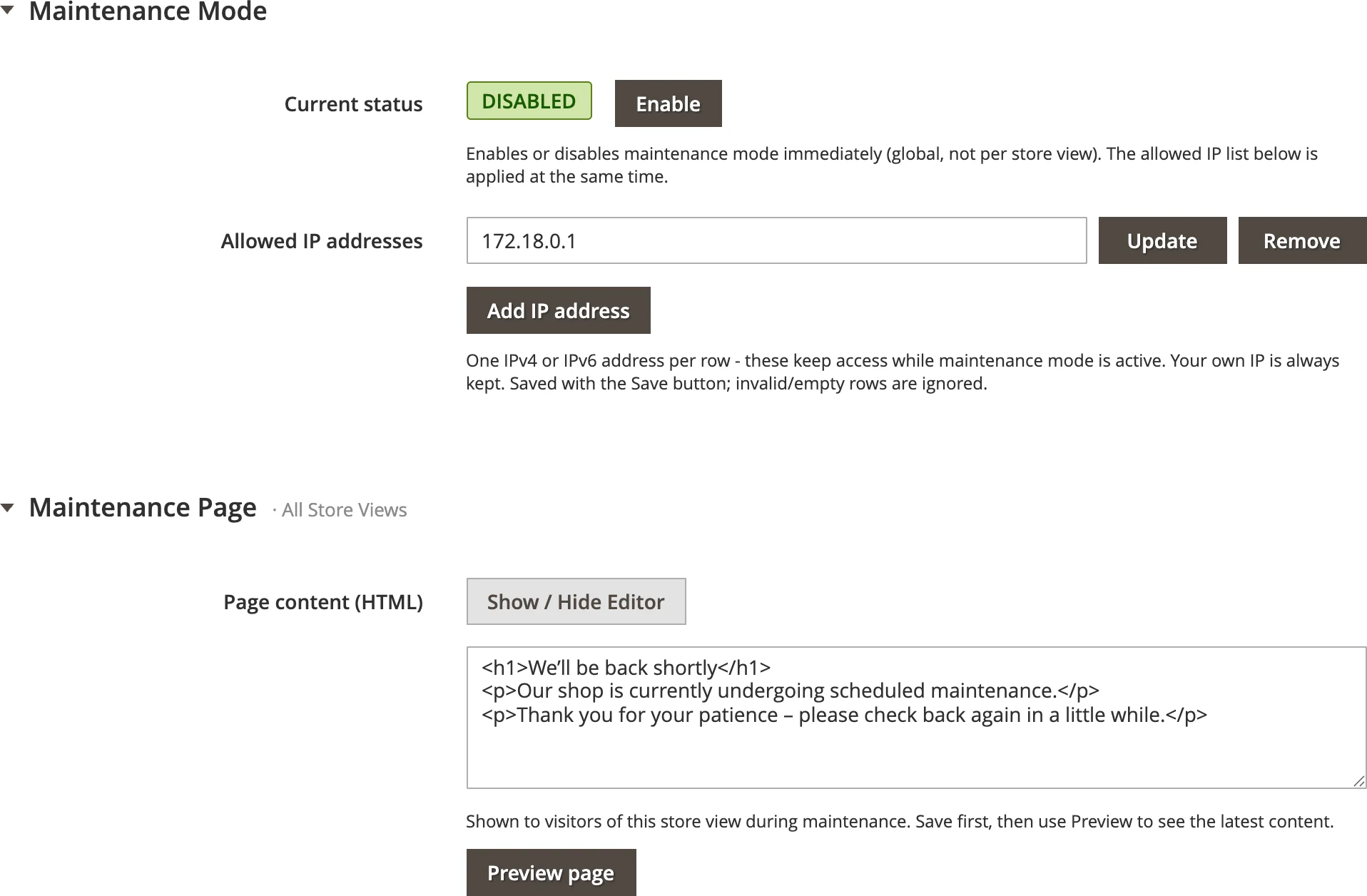
The configuration page shows the current status, a list of allowed IP addresses and one action button whose label depends on the current state:
| Element | Description |
|---|---|
Current status |
Colored badge showing whether maintenance mode is currently Enabled (red) or Disabled (green). |
Allowed IP addresses |
A repeatable list of IP addresses (IPv4 or IPv6), one per row, that stay allowed while maintenance mode is active. Use Add IP address to add a row and the Remove button to delete one. Each entry is validated in the browser; invalid or empty rows are ignored. Your own IP is shown as a locked row (marked "your IP") that cannot be edited or removed. When maintenance mode is off, the list is pre-filled with your currently detected client IP; when it is on, it shows the IPs currently on the allowlist plus your own IP. |
enable maintenance |
Shown when maintenance mode is currently disabled. Activates maintenance mode and stores the given IP allowlist. |
disable maintenance |
Shown when maintenance mode is currently enabled. Deactivates maintenance mode again. |
After saving, a success message ("Maintenance enabled." / "Maintenance disabled.") is displayed and the page reloads with the updated state.
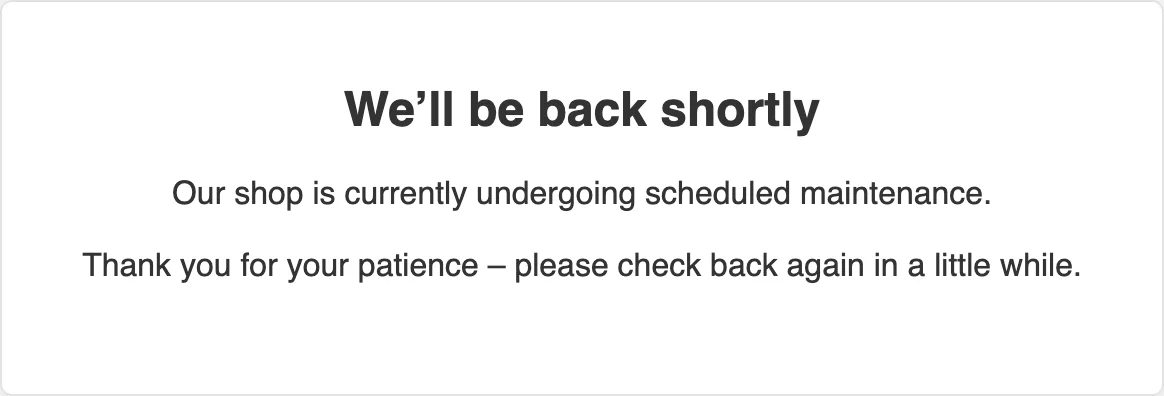
Maintenance page (503)
Below the settings, the Maintenance Page section lets you edit the content that visitors see while maintenance mode is active (the Magento 503 page) in the standard Magento WYSIWYG editor. Edit the text and save it with Save page content – this is stored independently of the enable/disable settings above. Variables, widgets and the media browser are intentionally disabled so the editor produces plain HTML, because the 503 page is a static file and does not resolve Magento directives.
Because Magento renders the 503 page through the standalone error handler in
pub/errors (which runs outside the application, without database access), the
module ships a custom error skin named cleverzoeger and stores your content as
a flat HTML file the skin reads at render time.
-
On every
setup:upgradethe skin is deployed topub/errors/cleverzoeger/and activated viapub/errors/local.xml(<skin>cleverzoeger</skin>). -
The editable content lives in
pub/errors/cleverzoeger/content.html; the shipped default is only used until you save your own content. -
You can preview the page without enabling maintenance mode by opening
https://<shop>/errors/503.php?skin=cleverzoeger.
How it works
The extension is a thin, backend-only wrapper around the Magento core service
Magento\Framework\App\MaintenanceMode:
-
Enable – sets maintenance mode on and stores the allowlist: the current client IP is always added first, each submitted IP is validated (IPv4 or IPv6 via
filter_var), invalid and empty values are dropped, duplicates removed, and the result is written in the comma separated format Magento expects. -
Disable – simply turns maintenance mode off; the stored allowlist is kept by Magento.
-
State & allowlist are read back from
MaintenanceMode::isOn()andMaintenanceMode::getAddressInfo().
This is equivalent to running bin/magento maintenance:enable --ip=… /
bin/magento maintenance:disable on the console, but available to admin users
in the browser.
IP detection behind a proxy / load balancer
etc/di.xml extends Magento\Framework\HTTP\PhpEnvironment\RemoteAddress
with the X-Forwarded-For header as an alternative source. Behind a reverse
proxy, CDN or load balancer the real client IP is therefore suggested in the
form instead of the proxy IP.
|
|
Architecture
| Component | Responsibility |
|---|---|
|
Renders the configuration page (HTTP GET). |
|
Handles the settings form submit (HTTP POST); enables or disables maintenance
mode depending on the |
|
Handles the maintenance page form submit (HTTP POST); stores the page HTML and redirects back to the config page. |
|
View model for the template; exposes |
|
Business logic; wraps |
|
Reads/writes the editable 503 content file and deploys/activates the custom
error skin ( |
|
Runs on every |
|
The custom error skin (self-contained |
|
Backend UI component (RequireJS/jQuery) for the repeatable IP list: add/remove rows and live IPv4/IPv6 validation; blocks submit on invalid input when enabling. |
Installation
composer require cleverzoeger/ext.magento2.cleverzoeger.maintenance
bin/magento module:enable CleverZoeger_Maintenance
bin/magento setup:upgrade
bin/magento cache:flush
CleverZoeger_Base is installed automatically as a Composer dependency.